Effortless MIDI Routing, Automation & Macros
Take command of your MIDI setup with MidiMacro. This powerful desktop app simplifies complex MIDI routing and macro creation through an intuitive, visual drag-and-drop interface, putting sophisticated control effortlessly at your fingertips.
- One-time payment
- Lifetime access
- Free updates
Complete MIDI Control & Automation Suite
Transform your MIDI controllers into powerful command centers. Perfect for streamers, music producers, content creators, and live performers.
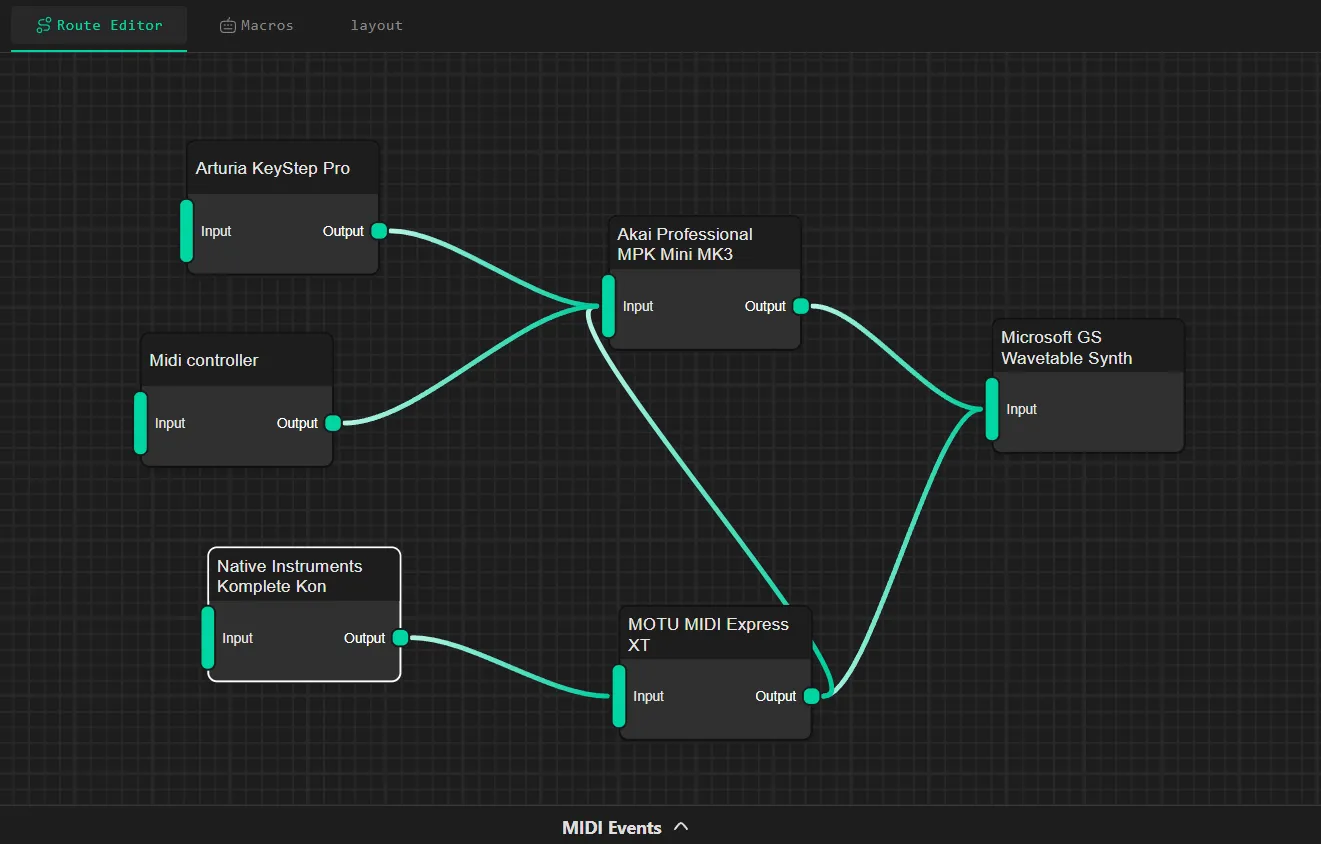
MIDI Routing Matrix
Create flexible MIDI routing configurations with our visual matrix. Connect any MIDI input to multiple outputs, monitor data flow in real-time, and manage complex routing setups with ease.
- One-to-many MIDI routing
- Real-time connection monitoring
- Persistent routing configurations
- Hardware ↔ Software Bridging: Route synths to DAWs, controllers to apps
MIDI-to-Keyboard Macros
Transform MIDI signals into keyboard shortcuts. Create custom hotkeys triggered by MIDI controllers for seamless workflow automation.
Auto Device Detection
Automatic device detection and connection memory. Hot-plug support for connecting and disconnecting devices without interruption.
Color-coded Device Management
Intuitive color-coded interface for easy device identification and management. Quickly distinguish between different MIDI controllers and their functions with visual organization.
Comprehensive MIDI Console
Real-time MIDI message monitoring with detailed information. Track, analyze, and debug MIDI data flow with our advanced console interface.
Perfect For Your Workflow
Whether you're a music producer, streamer, or content creator, MidiMacro adapts to your needs.
Music Producers & Sound Designers
Route MIDI controllers to DAWs like Ableton or FL Studio, map pads to keyboard shortcuts (play, record, loop), and control plugins with tactile knobs.
Live Streamers & Broadcasters
Turn MIDI controllers into OBS hotkeys: switch scenes, mute mics, or launch sound effects—no keyboard needed. Route hardware mixers to stream software seamlessly.
Video Editors & Content Creators
Assign MIDI buttons to Premiere Pro or Final Cut shortcuts: cut clips, adjust timelines, or export projects faster with hardware control.
DJs & Hardware Enthusiasts
Connect multiple MIDI devices (e.g., launchpads, mixers) to DJ software. Map pads to cue points or sync lighting rigs via MIDI routing.
Power Users & Keyboard Warriors
Replace repetitive typing with MIDI-triggered shortcuts: automate app launches, text snippets, or system commands (Alt+Tab, Ctrl+S) across Windows/Mac.
MIDI Hardware Hackers
Route signals between synths, drum machines, and DAWs. Turn legacy MIDI gear into modern macro controllers for software like Photoshop or Excel.
From MIDI to Magic
Capture, Configure, Create - Your MIDI workflow automation in seconds
- Step 1
Capture MIDI
Connect your MIDI device and capture any MIDI event with a single click. Watch as your device's input is instantly recognized.
- Step 2
Assign Macro
Map your captured MIDI event to any keyboard shortcut or custom action. Create powerful automation workflows in seconds.
- Step 3
Trigger & Test
Test your macro instantly. When you trigger the MIDI event, your assigned action will execute automatically.
Transform Your MIDI Setup Today
No subscriptions, no hidden fees. Pay once, get lifetime access with free updates.
MidiMacro License
One license, every feature.
- All features included
- Lifetime updates
- Windows, Mac & Linux support
Need Help?
We're here to help! Whether you have a question, found an issue, or have ideas for new features, we want to hear from you.